INTRODUCTION TO EDITING A LOCKBOX CASH RECEIPT BATCH
This option produces the same edit listing that you receive when you
exit Menu ARLKBX, Item Change Lockbox.
Note: if you try to post cash receipts that have
errors, they will NOT be posted, and will be deleted from the file.
Note: any record on the cash receipts edit listing
(produced when the lockbox cash receipts were converted) marked: "WILL NOT BE POSTED” will appear on the
Cash Receipt Register marked “RECORD NOT ADDED".
HOW TO PRODUCE A CASH RECEIPT EDIT
To begin,
on the “Accounts Receivable Master” menu, click [Transactions].
The
screen will display:
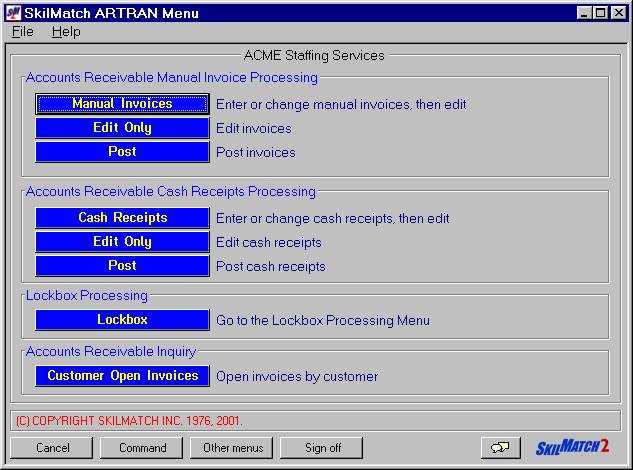
Click [Lockbox].
The
screen will display:
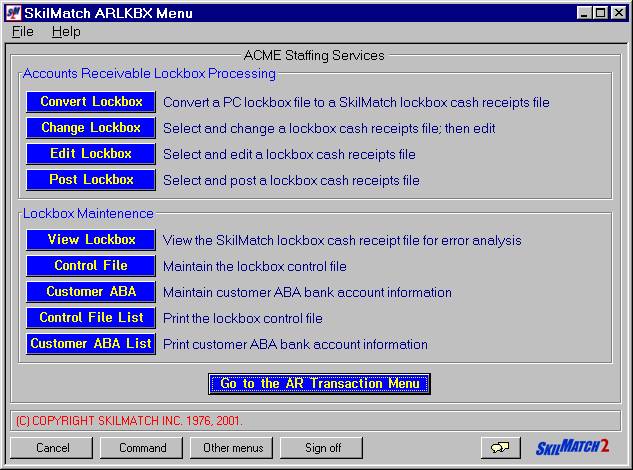
Click [Edit Lockbox].
The screen will remain ‘input inhibited’ while the
report is compiled.
Edit Listing:
Check your outq for the edit report.
The edit will sort the entry records by company number, and will start a new page for each company. Within a company, the records will print sequentially by key number (sequence number).
Terminal Errors
Include:
Note:
SkilMatch recommends you do NOT delete any records from a lockbox cash
receipts batch. If the problem cannot
be resolved, leave the record in the cash receipts batch and post. Your cash receipts register will list the
items that did NOT post in addition to the items that did post. This information may prove helpful for
future reference.
Note: if you try to post cash receipts that have
errors, they will NOT be posted, and will be deleted from the file.
Note: any record on the cash receipts edit listing
(produced when cash receipts were entered) marked: "WILL NOT BE POSTED” will appear on the Cash Receipt
Register marked “RECORD NOT ADDED".
Correcting Terminal
Errors:
If you had "terminal" errors on your edit, re-enter the Change Lockbox option to make the corrections. Refer to document Menu ARLKBX, Item Change Lockbox for assistance.